


Expedia: Hotels, Flights, Cars review
 Analysis by GetAllApps
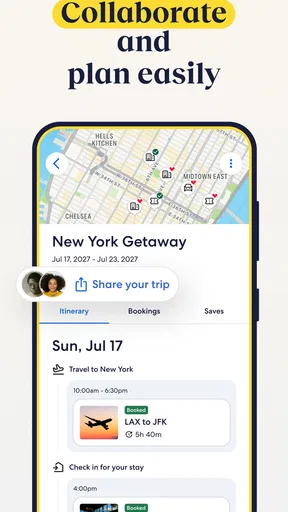
When I use Expedia to plan a trip, I’m looking for more than a place to sleep: I want to see whether flights, accommodation, transport and activities can fit together without turning planning into a pile of separate searches. This free travel planning app from Expedia is built around that kind of trip, with the option to look for bundled travel as well as individual bookings. My main impression is that it is most useful when I have a destination and a rough plan, but still need to compare practical choices.
Trust starts with checking the details
Travel bookings involve decisions that can be hard to undo, so I would not treat a polished search screen as a substitute for checking what I’m buying. In Expedia, I pay particular attention to the final booking details: dates, traveller names, room or fare terms, cancellation conditions and the total shown before confirming. Those are the points where a small misunderstanding can matter more than any convenience the app offers.
The app is developed by Expedia and sits in the travel and local category. It has a 4.8 average from around 1.7 million ratings, with roughly 92,000 written reviews and over 50 million installs. Those figures indicate that many people use it, but they do not tell me whether a particular hotel or fare suits my needs. I still read the property details and booking terms rather than relying on popularity as a guarantee.
I also distinguish between Expedia’s role as a booking service and the policies of the individual travel provider. A hotel, airline or car-rental company may set conditions that differ from one booking to another. Before I commit, I look for who is supplying the service, what is included, and how changes or cancellations are handled. That habit is especially important when comparing an inexpensive option with one that offers more flexibility.
For a trip where the plan is settled, a bundled search can make comparison more manageable. For a trip with uncertain dates or a likely change of plans, I put flexibility ahead of convenience and inspect each component separately. A package can be appealing, but the apparent simplicity of one itinerary should not distract me from understanding the terms attached to its separate parts.
What the app is useful for
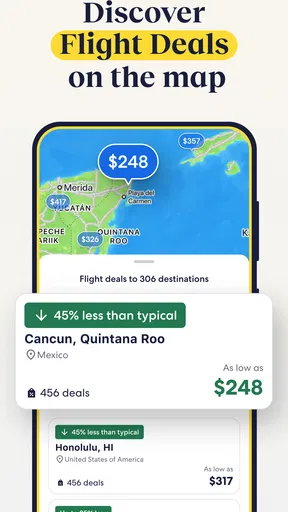
Expedia’s appeal is the chance to work across several travel needs in one place. Instead of beginning with a hotel search in one service, a flight search in another and activities elsewhere, I can use it as a central starting point. That is a practical advantage when I am deciding between possible trip shapes: a shorter stay near the main attraction, a different flight time, or an itinerary that leaves room for an activity.
The app is free to download and is rated for Everyone. Expedia launched on May 10, 2011, and the current version is 2026.42.0, with Android 10 as the minimum operating-system requirement. Those details help set expectations about compatibility and access, but they do not tell me how a specific booking will work. I treat the app as a convenient way to research and manage choices, not as a reason to skip careful review.
Compared with using separate airline, hotel and activity apps, Expedia is more convenient when I want to survey a trip in one planning flow. The trade-off is that a specialist provider’s own app may be a better place to review that provider’s rules or handle a booking directly. I would use Expedia to compare options, then pay close attention to the supplier and the terms attached to whichever option I select.
Privacy and visible choices deserve attention
Because travel planning can involve personal details and payment information, I take a deliberate approach to what I enter and when. I wait until I’m ready to make a booking before providing information needed to complete it, and I check the account and checkout screens for the choices they present. I don’t assume that a permission or privacy setting exists unless I can actually see it in the app.
That distinction matters: I can make sensible choices about my own use, but I should not infer a particular data practice, permission request or account-control feature without seeing it. My practical advice is to review the app’s current privacy information and the choices shown on your device, then decide what you are comfortable sharing. If a prompt appears, read it before accepting rather than tapping through simply to reach search results.
I also avoid treating saved details as a convenience I must use. If I prefer to enter information only when needed, I can take that slower route and check each field as I go. For a shared or borrowed device, signing out when finished is a straightforward precaution. These are habits, not claims about special Expedia controls, and they help keep the traveller in charge of the information they choose to provide.
A booking workflow that reduces avoidable mistakes
When I’m comparing flights and accommodation, I first settle the dates and the number of travellers, then compare options without rushing into checkout. I open the details for promising choices and check whether the schedule, location and terms fit the actual trip. Only after that would I consider combining parts of the trip. This order helps prevent an attractive bundle from becoming the starting point for decisions I have not yet made.
A useful, easily overlooked trade-off is that a lower total is not automatically the better value. I compare what is included and how much flexibility I would give up, especially if my plans may shift. If one element of a package has strict conditions, I weigh that risk against the convenience of keeping the booking together. When flexibility is essential, separate searches or booking directly with a provider may be the more sensible route.
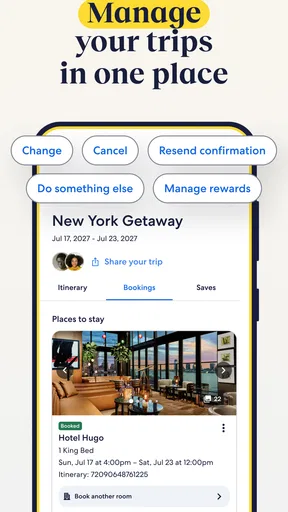
I also keep a personal record of the important booking details after confirming: dates, supplier, confirmation information and relevant terms. That makes it easier to answer the basic question, “Who do I contact about this part of the trip?” It is particularly helpful when an itinerary includes more than one kind of service. I would not rely on remembering details from a search screen after the fact.
For a realistic example, imagine I’m arranging a weekend away and have only a broad idea of when I want to leave. I can use Expedia to explore the combination of travel and accommodation that looks workable, then check the conditions before committing. If my dates are still uncertain, I pause and compare flexible alternatives rather than assuming a package will be easy to change. Once the dates are fixed, I can look at activities as an added part of the plan instead of letting them dictate the whole schedule.
Where it fits—and where I would choose something else
I’d recommend Expedia to someone who wants one familiar place to begin planning a trip with several moving parts. It can be especially handy for comparing a trip’s broad shape, finding accommodation alongside transport, or considering activities without starting from scratch in every category. The strongest use case is not necessarily booking everything at once; it is having a single planning tool that helps me see options before I decide how to book.
I would be more cautious if my trip depends on unusual booking conditions, extensive flexibility or a provider-specific arrangement. In those cases, the airline, hotel or rental company’s own channel may make the relevant terms easier to assess, and a specialist search tool may offer a more focused comparison. Expedia is also less compelling if I already know exactly what I want from one provider and do not need a combined planning view.
Another limitation is the risk of choice overload. Looking across several kinds of travel can make it tempting to compare too many possibilities without a clear priority. I get better results when I decide what matters most first—location, timing, flexibility or total cost—and use that as a filter. Otherwise, a long search can feel productive while making the decision less clear.
My cautious verdict
Expedia is a useful option for organising travel research and considering more than one part of a trip in the same app. I like its value as a starting point for comparing plans, especially when I have a destination in mind but still need to work out the details. Its broad reach does not remove the need to inspect supplier terms, and I would not mistake a convenient booking flow for a guarantee that every option is right for me.
My recommendation is to use it actively but deliberately: compare, open the details, check the cancellation and change conditions, and confirm who provides each service before paying. Be equally thoughtful about account and privacy choices, relying on the controls and notices you can actually see rather than assumptions. If you want an all-in-one place to explore a trip, it is worth considering; if your priority is a highly specialised booking or maximum control over one provider’s rules, a direct or category-focused alternative may serve you better.
My short version: I’d keep Expedia in my travel-planning toolkit, but I’d make the final decision with the booking terms in front of me. It is most helpful when it broadens your view of the trip; it is not a reason to stop asking careful questions before you book.
Pros and cons
Pros
- Compare hotel options and book directly in the app.
- Save trip details for convenient access while traveling.
- Manage hotel and flight reservations in one place.
- Use trip updates to keep track of itinerary changes.
- Find rental cars alongside flights and accommodations.
Cons
- Prices and availability can change before checkout.
- Some bookings may have separate cancellation rules.
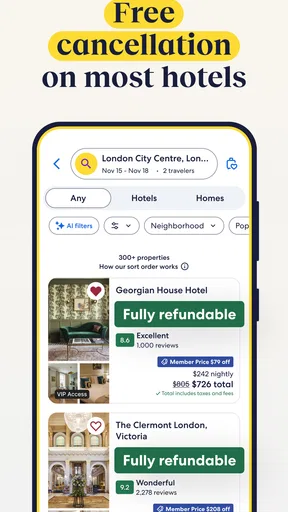
- Not every property offers free cancellation.
- Customer support options can vary by reservation type.
- Car rental terms may differ from the displayed summary.


